Plugin Inspector
Inspect third-party JARs before installing them on your server.
What It Does
Plugin Inspector lets you upload any third-party Minecraft plugin JAR and receive a plain-language report describing what could go wrong on your server — without reading a single line of code. It's built for server owners, not developers.
Findings are grouped into four tiers. The first three are problems; the fourth is just for your information:
- CriticalCould freeze or crash your server, corrupt player data, or let one player harm others.
- WarningReliably breaks or degrades a specific feature — something you'd notice and care about.
- LowReal but minor — worst case is cosmetic or a narrow edge case.
- InfoThings this plugin can do that are normal for plugins like it — shown for your information, not problems. A plugin with only Info notes has no issues, and Info is hidden until you turn it on.
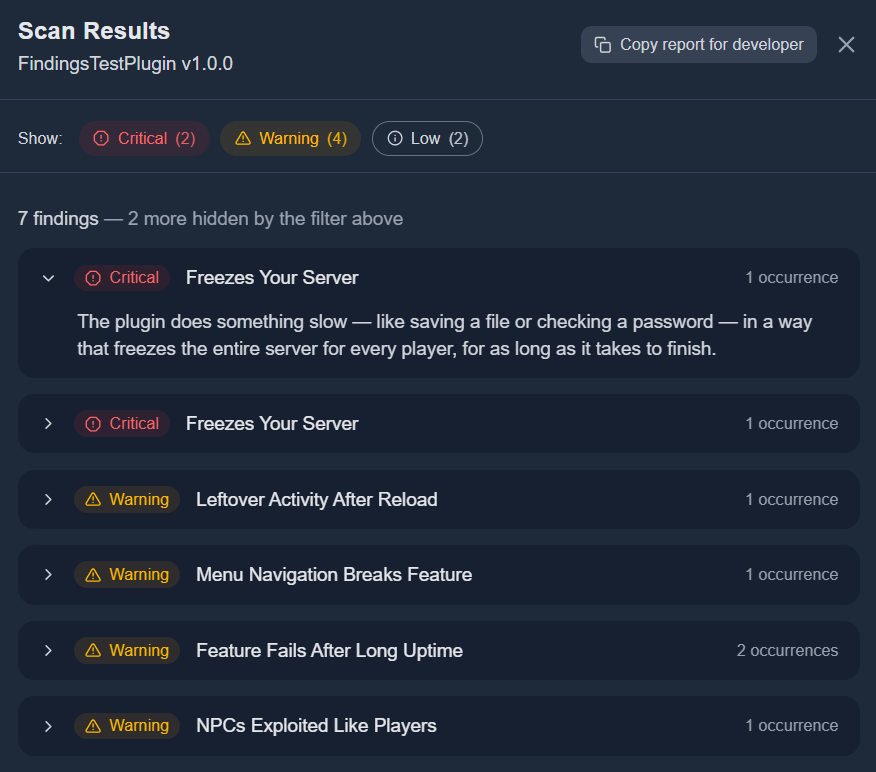
Inspection report for a test plugin — findings sorted worst-first, written in plain language for server owners.
How to Use It
- In the sidebar, click Plugin Inspector to expand the section, then click Inspect a JAR.
- Select the
.jarfile you want to inspect (max 50MB), confirm you have the right to analyze it, and click Upload and Inspect. - The inspection runs automatically. Once complete, click the entry in your inspection list to open the report.
- Use the severity toggle pills (Critical, Warning, Low, Info) to focus on what matters most. Filtering is instant — no page reload.
- Click any finding row to expand its one-sentence description. Use Copy report for developer to export a full technical report you can share with the plugin's author.
- Some notes are only useful to the person who wrote the plugin, such as small tidy-ups in how it was built. These developer notes are never shown in your report and never count toward your totals; they are included only in the report you copy for the plugin's developer, in a separate section.
What Plugin Inspector Checks
Plugin Inspector runs more than 80 static checks drawn from real Minecraft production failure patterns. A few examples:
Vendor-bundled libraries (bStats, Configurate, SnakeYAML, etc.) are automatically excluded from checks so only the plugin's own code is analyzed.
Inspection Management
Every inspection is saved to your inspection list. If you upload the same JAR twice, Plugin Inspector detects the duplicate and points you to your existing result rather than running again.
Inspection entries can be renamed (hover and click the pencil icon) or removed from your list (hover and click the trash icon). Removing an inspection only hides it from your view — the underlying result is retained.
Legal note
By uploading a JAR you confirm you own it or have the right to analyze it. Plugin Inspector performs static analysis only — no decompiled source is stored or shared. Your raw JAR bytes are deleted immediately after the inspection completes.